PROJECT UPDATE

June 2023

In this edition:

  • One year of Grants and COI in UTRMS
  • Newest updates to functionality
  • IACUC and Animal Operations Progress Check
  • GEPA 427 form Information

Congratulations


Change is hard, but you've got this! One year in and you're using UTRMS for grant application and management as well as conflict of interest reporting. Using UTRMS this past year, UT Austin has:


  • submitted over 8500 funding proposals
  • managed over 5000 awards
  • sent in-system messages and communications
  • developed budgets
  • completed faculty and research disclosure profiles
  • processed almost 1000 pre-approval requests


Thank you for all your hard work and patience as we learn and work together to change our world through research.


UTRMS 2023 Upgrade Complete

Successful 10.5 Upgrade


On May 1, 2023, UT Austin successfully began using Agreements, Grants & IRB 10.5 (and COI 10.3). The upgrade that took place throughout the weekend of April 28 went smoothly, adding improved functionality. Some of the changes we've heard the most excitement about:


  • improved access management in the Agreements and Grants modules
  • option to budget effort using Person Months or Percentage

The benefit of using a SaaS (software as a service) product is that it will continually improve as we use the product. If you have suggestions or recommendations for how to make it easier to use, please let us know by submitting a Support Ticket Request.


In the meantime, some more improvements coming soon include:

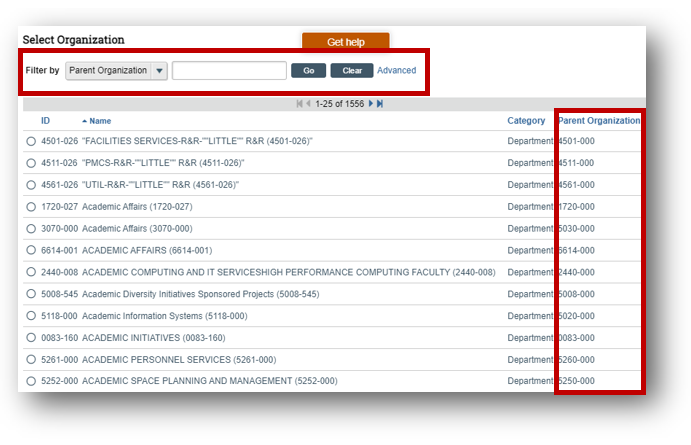
Departmental Unit Codes

Within UTRMS, Department listings will now include the UT Unit Code. You can search based on "Parent Organization" or unit code as well as the other fields.


Email Address of Choice

Email addresses used by UTRMS are changing to match what each user has set in Workday. If you are happy with how UTRMS notifications come to your email, you do not need to do anything. If you would like to change the email address that UTRMS send notifications to, here are a few things you need to do:

  • Check Workday to ensure the email address you would like the University to use for important communications is accurate.
  • Update your Workday email if needed. For directions on how to change your Workday email, click here.
  • Check the Rules you have set up in your email to ensure any change in email addresses is reflected in how your rules are set up to sort your emails.


These updates are anticipated by the end of July 2023.

SF424 Updates

In early July 2023, SF424 will receive a patch that will correct some errors that were seen in a few of the forms and some performance problems with PDF generation.

ED General Education Provisions Act (GEPA) 427 Form

Currently, many applications require GEPA 427 V2.0. This version (2.0) of the form will not be supported by UTRMS until late Fall 2023. If your application requires GEPA 427 V2.0, and the application is due in 2023, at this point in time, please plan to submit your application using the Grants.gov workspace directly. Click here for directions on how to use Grants.gov for your application.


This issue will be resolved with the release of the next version of SF424. The release of SF424 10.6 is expected from Huron in the fall of 2023. UT plans to incorporate this upgrade as soon as possible.

IACUC and Animal Operations

The IACUC and Animal Operations onboarding has begun. The project team and key users of IACUC and Animal operations have started to learn what Huron has to offer and how UT can best use these products. Streamlining processes, improving data access and reliability, and meeting regulatory needs are just some of the priorities being considered as we work to bring on these new modules.


Look for an estimated Go Live for both IACUC and Animal Operations in Spring 2024.

IACUC

Animal Operations

(AOps)

System Tips

Trying to Update your Disclosure Profile?


Have you been trying to update your Disclosure Profile but you keep getting this error message?


"Could not execute the Complete Disclosure Profile Update activity due to one or more errors."


The error message displays when you attempt to complete your disclosure profile prior to receiving a notification from UTRMS. When it is time for you to update your disclosure profile, you will receive an email stating:


"You are required to complete a COI Disclosure Profile update at this time in order to comply with institutional policies for disclosure of financial interests and outside activities. Follow the link included in this email to log in to set up your Disclosure Profile or to complete a Disclosure Profile update in the UTRMS-COI system."


Once you receive this email, your Disclosure Profile is available to update.

Help Resources in UTRMS


Click here to view a video on locating help resources while working in UTRMS. Resources include documents, videos, walkthroughs, question-level clarification, and links to support.

student_help.jpg


If you need help with any part of UTRMS, please reach out to the Research IT Team using a Support Request Ticket.

 The UTRMS Project Update is released quarterly. You are receiving this newsletter because you have subscribed to our listserv or are a member of a UT research listserv. You can unsubscribe from this newsletter at any time. View past issues of our newsletter here.


Do you think a coworker would find this helpful? Please forward to a friend. Sign up for our newsletter.


If you have a project-related question, concern, request for additional information, or training inquiry, you may reach us via the contact form on our project website.