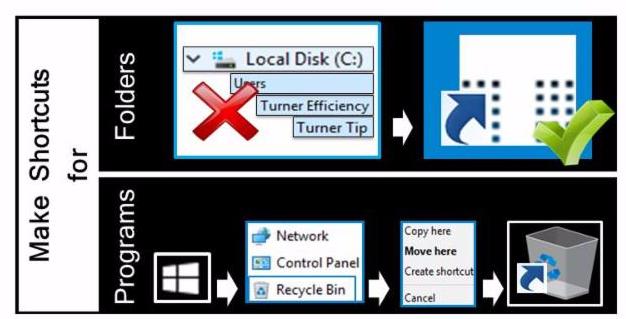
Eliminate extra keystrokes by setting up shortcuts.
Instead of multi-clicking to reach your files, Facebook or favourites, simply click a shortcut.
NOTE: If you can't create desktop icons, put a hyperlink in a task or on your calendar (recurring weekly).
To set up a shortcut for:
PC program: in the control panel (bottom L), right-click on the program name>drag it to the desktop>create shortcut
Mac: launch Safari>go to the desired webpage>select the address bar>click and drag the address to the desktop
Samsung Galaxy: home screen>Customize icon>More>click your webpage bookmark (or another desired shortcut)
BlackBerry: home screen>Menu>Add to Home Screen>Desired application>Add as shortcut>Menu>Add to Home Screen or Mark As Favorite
Android: hold Home Screen>Shortcuts>Webpage, Bookmarks, etc.>follow prompts
iPhone: launch Safari>go to the desired webpage>Share>Add to Home Screen>Name>Add
Tablet: save webpage as a bookmark>Open Bookmarks>Hold finger on desired bookmark>Add
iPad: launch Safari>go to the desired webpage>Go>tap shortcut icon (top R)>Add to Home Screen>Name>Add
PC file: select the desired file>right-click>hold and drag to the desktop>create shortcut
PC webpage: download Google Chrome web browser>Open Google Chrome>Facebook>Wrench (top R)>Tools>Create Application Shortcut>choose desktop, start or both>Create