Right-Click for Ultimate Email Control
Right-clicking will:
- confirm an action
- convert formatting
- efficiently manage work
To ensure accurate conversion, choices and attachments, stay attached with right-click, hold & drag.
To file an email: Right-click, hold & drag
the email to the file, release the mouse button and choose.
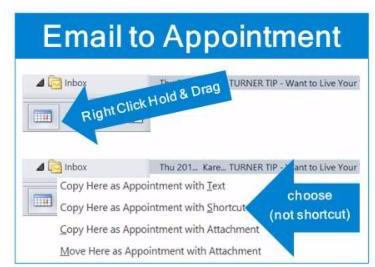
To convert an email into an appointment: Right-click, hold & drag
the email to the calendar icon, release the mouse button and choose. (Never choose shortcut as it can get in a loop.)
To add an email to a calendar event
: Open the calendar event (it can't be whole screen), go to email, right-click, hold & drag the email to the
Outlook icon (at the bottom of the screen), continue to hold the mouse button and drag the cursor onto the appointment, WAIT until the calendar opens and slide the mouse into the calendar body, release the mouse button and choose.
NOTE: Sometimes "move" will copy. Simply delete the email in the inbox. It will still be in the calendar.
To remember that you have work from a meeting: Right-click, hold & drag
the calendar to tasks, release the mouse button and choose.
To quickly file an email to your computer: Right-click, hold & drag
the email or just the attachment to the computer.