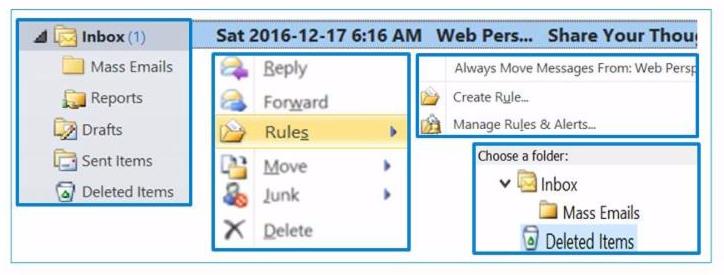
Depending upon your email, 3-5 rules should be ample.
Imagine checking multiple mailboxes as you enter your home. Sometimes we don't even have time to open one mailbox.
So only use rules to file emails you don't need to immediately see, such as mass emails and reports.
And send those you would "unsubscribe" from to Delete. Unsubscribing confirms a valid active email address, so you are in jeopardy of receiving future mail if the list is sold and/or a possible virus if it's spam.
To create a rule:
Right-click on the email and choose Rules.
To file according to email subject, choose Create Rule.
To file according to email sender, choose Always Move.
Choose a destination folder.
Client Feedback
"A 5/5. [This email training is] very informative, and I'll commit to keep on inbox cleaning."
"A 5/5. The routine of cleaning the folder is definitely very useful."
"A 5/5. I can now organize my work life better."
"A 5/5. Very helpful. I can use delete, and I've learned to eliminate unnecessary waste."