|
Supply Chain Management News
November 2023
| |
|
Dear Campus Community,
Supply Chain Management (SCM) would like to inform you of important updates and events.
This month's features:
- BearBUY Guided Dashboard Landing Page
- Bears that Buy Open Office Hours: Here to Make Purchasing BEARable
- Winter Break and Curtailment
- Copy Cart: Risks and How to Reduce the Errors
- How to fix the CSS Processing Error Message?
- Change Requests vs PO Direct Revisions (BRS/Buyers)
- New! Rainin Service Clinic Dates for 2024
- Skilled Freelancers and Independent Contractors through Upwork!
If you have any questions, please contact the BearBUY Help Desk at
510-664-9000 (options 1, 2) or bearbuyhelp@berkeley.edu for immediate assistance.
Thank you for your continued support,
Supply Chain Management
| |
|
BearBUY Guided Dashboard Landing Page | |
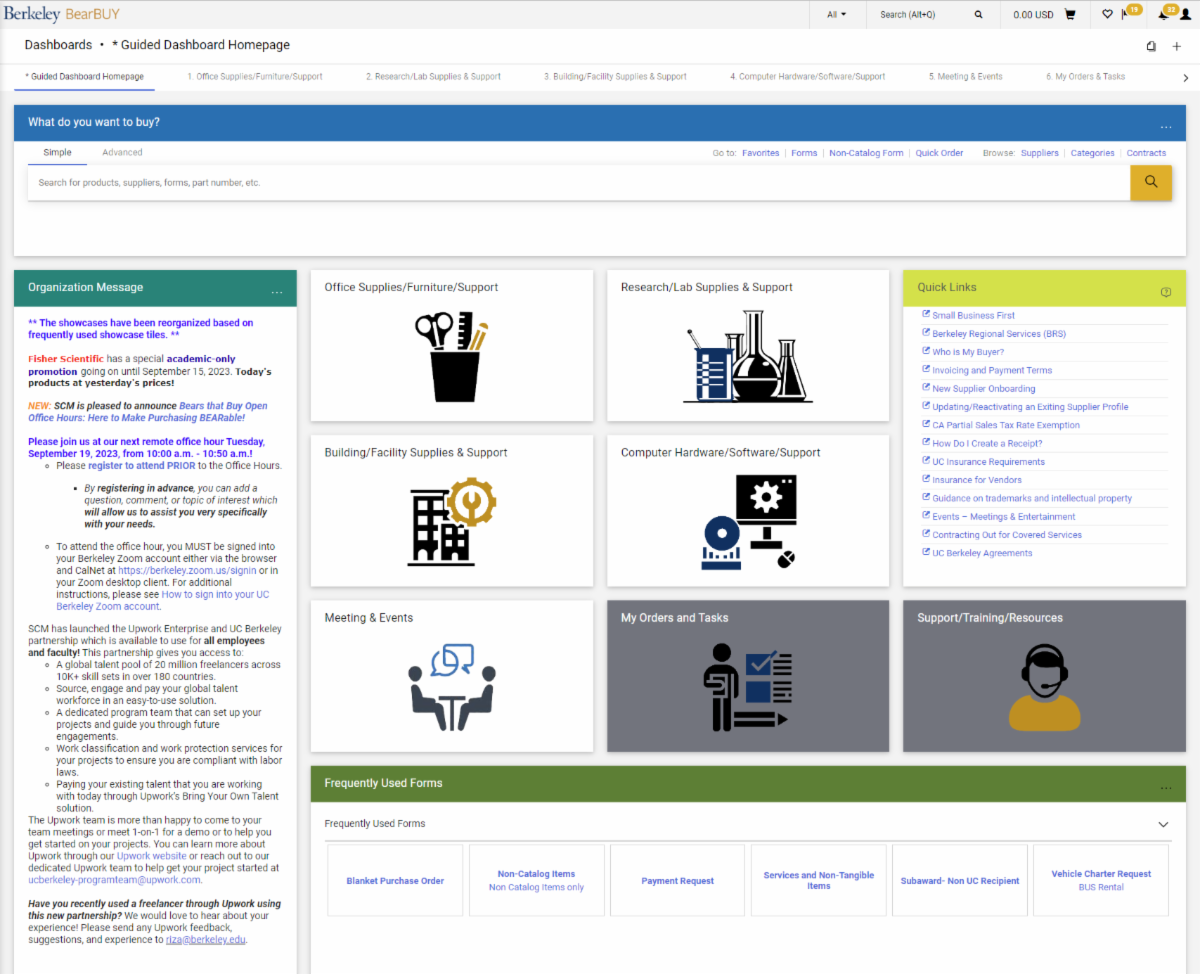
Started on Monday, November 6, 2023, the BearBUY DEFAULT Landing Page is the NEW Guided Dashboard Landing Page: | |
Please take a look at the Guided Dashboard Overview for a detailed breakdown of the new features.
REMINDER: Users will be able to reset their personal landing pages to the legacy, classic BearBUY landing page by viewing the How to set your personal default landing page in BearBUY Job-Aid.
| |
Bears that Buy Open Office Hours:
Here to Make Purchasing BEARable
| |
|
Please join us at our next remote office hour tomorrow, Tuesday, November 21, 2023, from 10:00 a.m. - 10:50 a.m.
As a reminder, representatives from SCM will be on hand to listen to your questions and provide information about purchasing at Berkeley. This will be held every 3rd Tuesday of the month from 10:00 a.m. to 10:50 a.m.
Instructions and Zoom URL:
| |
Winter Break and Curtailment | |
|
Business Services (BearBUY, Procurement, Business Contracts & Brand Protection, Property Management, and Library Bindery) will observe the Thanksgiving closure period from 11/23/2023 through 11/24/2023 and winter curtailment/holiday break beginning at noon, 12/22/2023 and returning to the office on 01/03/2024.
The campus community is encouraged to submit requests for services and high-value orders (over $10,000) by 12/01/2023 for any goods or services required for research and operational continuity in December. Business Services will make every effort to complete work in the order submitted. During the curtailment period, self-service tools such as BearBUY, BETS, and BCMS will be available for use although approvals will be impacted by staff availability.
Catalog orders that meet auto-approval thresholds will continue to dispatch normally in BearBUY. Orders requiring additional approval levels may be delayed based on departmental staffing levels across campus.
Emergency Life-Safety acquisitions and automatic approvals (such as catalog orders under $1,000.00) will continue to be processed over the curtailment periods.
If you have an emergency during this time, please email your assigned buyer and copy supplychain@berkeley.edu with the subject line "Emergency Acquisition" and be sure to include a description of the business need as well as a PO or Requisition Number. A buyer will contact you as soon as possible during regular business hours.
As a reminder: Only those emergencies necessary to protect the life-safety of the campus community will be processed. Departments must plan to obtain sufficient safety stock to maintain research continuity.
Please report any service issues or unscheduled downtime to bearbuyhelp@berkeley.edu. When checking Service Levels, please note a delay in turnaround time due to limited staffing.
For emergencies related to Moving Services and Property Management, please contact Eric Anglim, Director, 510-409-0044, eanglim@berkeley.edu; include a description of the emergency and return contact information.
Source: https://supplychain.berkeley.edu/news/scm-winter-curtailment-2023
| |
Copy Cart: Risks and How to Reduce the Errors | |
|
The Copy Cart feature is a popular way to reduce data entry for frequently re-ordered goods and services. However, this powerful feature is not without the risk of errors ranging from pricing discrepancies to missing field elements. Incorrect values or missing fields can cause the following problems:
- Supplier rejects order for incorrect price or discontinued part number.
- Supplier bills at the new price, creating price disputes that delay payment and trigger Match Exception rules.
- Old carts do not have the same data entry fields as the new form creating errors in processing purchase orders, changes, or payments. Examples of fields include “Business Unit”, “Change Order Processing”, “Urgent”. If those fields are either not populated or incorrectly used, orders will error out at one or more stages in the life cycle.
We encourage shoppers to use care with the copy cart feature. Please check for current pricing and to ensure that your shopping cart includes values for the “Business Unit” and “Change Order Processing” fields before submitting it. Please do NOT copy a cart that has an “Urgent” flag.
As a best practice, we encourage shoppers to save frequently ordered catalog items as favorites rather than copying carts so that you can see price updates and discontinued parts. Please use the most recent versions of forms saved in the Organization Favorites or available on the dashboard pages rather than copying carts with older form versions. These practices will save you from unintended risks from copying older requisitions.
| |
How to Fix the CSS Processing Error Message? | |
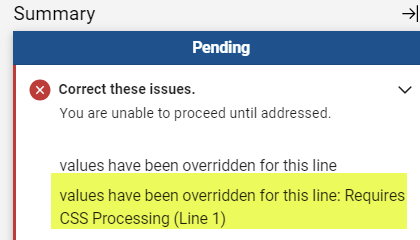
As part of the BearBUY 23.3 upgrade, we removed the CSS (Campus Shared Services) Processing requirement because the Berkeley Regional Services (BRS), the successor to CSS, does not use this workflow step to process orders. In removing this requirement, some requisitions that were started/initiated before Monday, November 6, 2023, might have the following error message in the upper right-hand corner of BearBUY | |
|
To fix this error, please follow the instructions below:
1: Open the Requisition
2: Press on the pencil icon in the upper right-hand corner of the Accounting Codes module
3: Remove (delete) the Account Code
4: Press the “Save” button
5. Again, press on the pencil icon in the upper right-hand corner of the Accounting Codes module
6: Re-enter the same account code
7: Press the “Save” button
| |
Change Requests vs PO Direct Revisions (BRS/Buyers) | |
|
In November 2022, we enabled the Change Request feature in BearBUY to give control back to the shopper. This feature allowed the shopper to dictate what change should be made in the purchase order. To help you decide whether you should create a change request or reach out to your BRS Purchasing Team or Buyer to request for a PO direct revision, please visit the Change Requests vs PO Direct Revisions website. Please pay attention to the helpful hints, reminders, and warnings.
REMINDER: Amount thresholds for PO direct revisions:
BRS Purchasing Team: Equal to or less than $9,999.99
Buyers: Equal to or over $10,000.00
If anyone has any questions, please feel free to reach out to us at bearbuyadmin@berkeley.edu. We would be more than happy to assist you.
| |
NEW! Rainin Service Clinic Dates for 2024 | |
Skilled Freelancers through Upwork! | |
|
Did you know? SCM has launched the Upwork Enterprise and UC Berkeley partnership which is available to use for all employees and faculty!
Through this partnership, departments are able to search and hire skilled freelancers and independent contractors without having to worry about obtaining and attaching a Certificate of Liability Insurance to Upwork orders.
Upwork will also take care of all onboarding and compliance tasks so there is no need to include extra supporting documentation on your PO besides the business justification, quote or estimate, and statement of work that is executed and provided to you by Upwork.
Interested in hiring a skilled freelancer or independent contractor? The Upwork team is more than happy to come to your team meetings or meet 1-on-1 for a demo or to help you get started on your projects. You can learn more about Upwork through our Upwork website or reach out to our dedicated Upwork team to help get your project started at ucberkeley-programteam@upwork.com.
Did you also know? If you know of a skilled freelancer or independent contractor that you would like to work with and they are not already in Upwork, you can easily get them on board by contacting the Upwork team!
Have you recently used a freelancer through Upwork using this new partnership? We would love to hear about your experience! Please send any Upwork feedback, suggestions, and experience to riza@berkeley.edu.
| |
Order Status
Please note that your SCM assigned Buyer will not receive the requisition until it has been approved by the department Org Node approver.
| |
Expediting an Order
If an order warrants expedited handling, please change the priority on the requisition to "Urgent". If you have already submitted the requisition, please contact your assigned Buyer via email and be sure to include the requisition number.
| |
Who is My Department's Assigned Buyer?
If you are unsure of how to start your purchasing transaction, contact your Buyer for assistance by using your Org Node and Department Name to find your assigned Buyer located in this matrix.
| |
Splitting Chart of Accounts (COA) At Header Level Vs. Line Level
Splitting COA at the Header Level will apply the split to all lines on the PO.
Splitting COA by Line Level allows you to customize COA percentage allocated to that specific line.
BEST PRACTICE for Subawards
-
Line 2 should always be set at the Header Level Chartstring using Account Code 57810.
-
Line 1 should be overridden at the Line Level Chartstring using Account Code 57811.
| |
SCM Service Level Turnaround Times
Urgent requests will be handled on a first-in-first-out basis. Standard turnaround time (Service Level Agreements) for purchase and contract types are available on our Service Level web page.
Please be aware that contract negotiations with suppliers may cause delays.
| |
Ship To Address vs Final Destination
A Ship To Address is the address that is sent to the supplier. When the supplier is delivering items, they will deliver to the ship to address (which is also visible on the PO they receive).
A Final Destination code is an address only associated to UC Berkeley. Final destination code are used when departments have a central receiving location. The ship to address is the central receiving facility. When the packages are received, the department central receiver looks the PO up in BearBUY and looks for the final destination code. The final destination code is then the office/room number of where shopper needs the items. Final destination codes are never sent to the supplier and are NOT reflected anywhere on the PO.
| |
Below are links to the BearBUY homepage, instructional aids, training courses, and information on how to create Service Now tickets for BearBUY related issues.
| |
Whether you are an experienced or a new BearBUY shopper, it is always best practice to take the BearBUY: Basics for Shoppers training if you haven't already.
To take this ESSENTIAL training, please click on this course #: BEESS950-Online
| | | | |