|
Supply Chain Management News
April 2024
| |
|
Dear Campus Community,
Supply Chain Management (SCM) would like to inform you of important updates and events.
This month's features:
- Supplier Expo 2024 - Welcome to Bear(BUY) Territory
- Upcoming AP Information Session
- Bears that Buy Open Office Hours: Here to Make Purchasing BEARable
- BFS, Blu, and BearBUY Outage
- Self-Manage Email Notifications
- U.S. Bank-funded UC Student Interns
- New IT Consulting Contracts: Innovation Awaits!
- NEW Feature: Missing Bill-To Address Warning
- NEW Feature: Supplier Search - New Experience View Enhancements
- Reminder: Upwork Info Sessions
If you have any questions, please contact the BearBUY Help Desk at
510-664-9000 (options 1, 2) or bearbuyhelp@berkeley.edu for immediate assistance.
Thank you for your continued support,
Supply Chain Management
| |
|
Supply Chain Management will host the Supplier Expo 2024 - Welcome to Bear(BUY) Territory on Wednesday, April 17, 2024, from 10:00 a.m. - 2:00 p.m., at the Pauley Ballroom in the MLK Student Union. | |
|
|
Suppliers will be on hand to share information about their services and the latest news regarding their work in sustainability, artificial intelligence, and supporting higher education. Please visit the Supplier Expo 2024 website for the expo floor plan, breakout session times and locations, raffle information, box lunch, and a digital supplier guide. If you did not pre-register, you are welcome to attend, meet suppliers, and participate in raffles. Lunches and other gifts will be available as supplies last.
** This event is for University employees. Please bring your
Cal ID to the event. ID will be checked at the door. **
| |
|
This event is sponsored by:
| |
Upcoming Accounts Information Session | |
Accounts Payable will host an information session on Monday, April 15, 2024, from 11:00 a.m. - 12:00 p.m. The session will provide an overview of the supplier update process, and a visual of the DocuSign PowerForms used to help with fraud mitigation. In addition, Supply Chain Management will talk about Upwork and how it can help departments looking for independent contractors or temporary staffing. To attend, add the session event to your calendar, or email disburse@berkeley.edu for more information | |
|
Bears that Buy Open Office Hours:
Here to Make Purchasing BEARable
| |
|
Please join us at our next remote office hour on Tuesday, April 16, 2024, from 10:00 a.m. - 10:50 a.m.
Representatives from SCM will be on hand to listen to your questions and provide information about purchasing at Berkeley. We encourage you to submit topics of discussion and/or questions in advance on this Google form.
These remote open office hours will consist of individuals from the Procurement, BearBUY Solutions, Account Payable, and BRS teams. This will be held every 3rd Tuesday of the month from 10:00 a.m. to 10:50 a.m.
Instructions and Zoom URL:
| |
Self-Manage Email Notifications | | |
|
|
BFS, Blu, and BearBUY Outage
| |
|
Please note that BFS, BLU Portal, and BearBUY will NOT be available on Friday, April 26, 2024, from 6:00 a.m. - 6:00 p.m. due to regularly scheduled system maintenance.
Please prepare for planned system downtimes and visit the Controller’s Office website for the planned 2024 BFS maintenance schedule.
| | |
|
Apply Now for U.S. Bank-funded UC Student Interns | |
|
Every year, U.S. Bank awards up to $125,000 in Student Engagement Funds to UC campuses. These UC student internship programs focus on improvements to UC’s Procure-to-Pay (P2P) systems, processes, or programs. Apply by May 1, 2024.
| | |
|
|
New IT Consulting Contracts:
Innovation Awaits!
| |
Systemwide Procurement has launched 12 new systemwide strategic agreements with top-tier IT Consulting firms available for use by all UC locations. These contracts were developed with input from Procurement, CIOs, CTOs, CISOs and other IT personnel to fully understand campus requirements and meet the needs of your future IT projects. | | |
|
NEW Feature: Missing Bill-To Address Warning Message | |
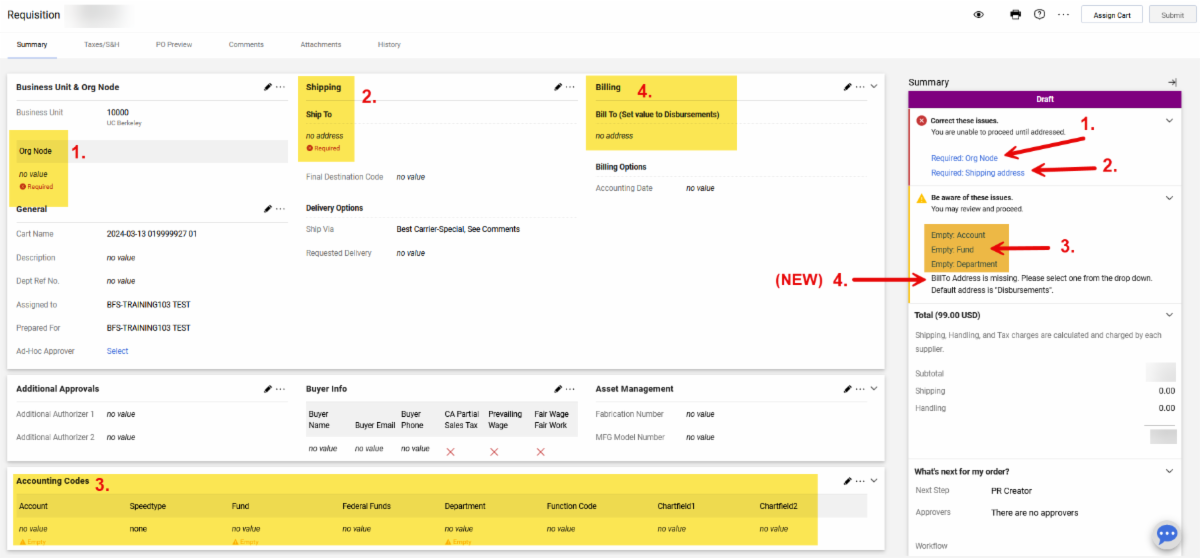
Currently, shoppers cannot submit a cart if the Org Node (#1) and Shipping address (#2) are missing. Shoppers receive a warning message if any of the fields in the chartstring are missing (#3) or if the Bill-To Address field is missing (#4). Complete all 4 fields to ensure the fastest order processing time. | |
After the Jaggaer 24.2 upgrade in July 2024, shoppers will not be able to submit a cart if the Bill-To Address is missing. | | |
|
|
NEW Feature: Supplier Search -
New Experience View Enhancements
| |
|
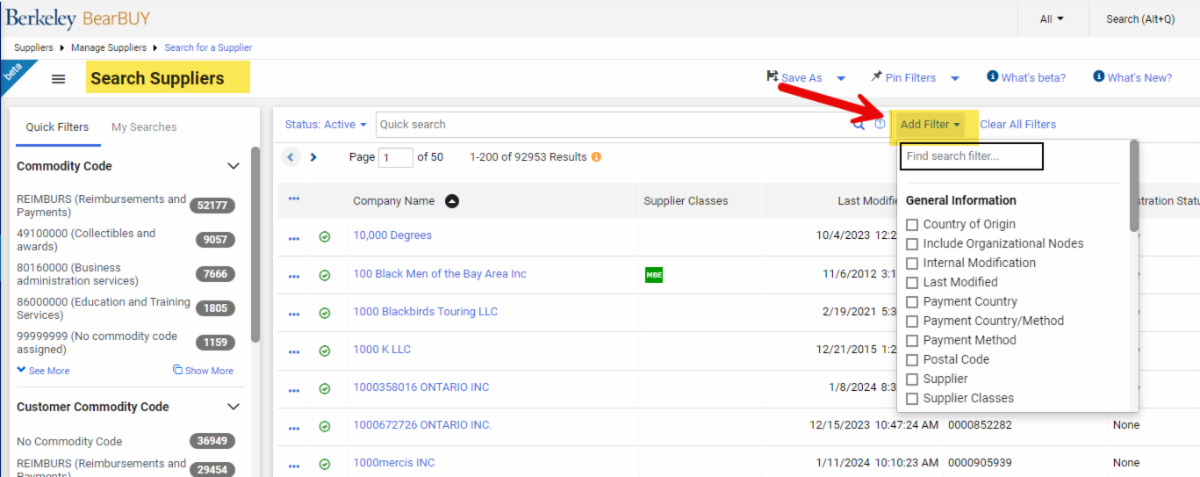
With this release, the new experience for Supplier Search is no longer considered in Beta. Features that are standard with the classic (current) Supplier Search and other enhancements are available in the new experience.
Old View:
| |
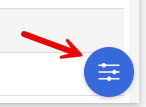
A Choose Your Experience toggle button, located at the lower right-hand corner of the screen, will allow users to switch between the new and classic views at any time: | |
|
Reminder: Upwork Info Sessions! | |
|
Have you heard of our Upwork program and would like to learn more about it? Supply Chain Management is pleased to announce three (3) different informational sessions on Upwork that are coming soon!
Please look into attending the following:
-
Monday, April 15, 2024, from 11:00 a.m. to 12:00 p.m.: The Accounts Payable Training Session will include an appearance from Supply Chain Management to talk about Upwork and how it can help departments looking for independent contractors or temporary staffing.
-
Wednesday, April 17, 2024, from 10:00 a.m. to 2:00 p.m.: The Supplier Expo 2024 - Welcome to Bear(BUY) Territory will include a breakout session hosted by Upwork. Upwork is one of the blue sponsors for this in-person event!
-
Wednesday, May 8, 2024, from 1:30 p.m. to 2:30 p.m.: In case you cannot make it to the sessions above, you can attend the Virtual Info Session that will be hosted by Upwork!
For questions and assistance with Upwork, please contact Riza Casal at riza@berkeley.edu.
| |
Order Status
Please note that your SCM assigned Buyer will not receive the requisition until it has been approved by the department Org Node approver.
| |
Expediting an Order
If an order warrants expedited handling, please change the priority on the requisition to "Urgent". If you have already submitted the requisition, please contact your assigned Buyer via email and be sure to include the requisition number.
| |
Who is My Department's Assigned Buyer?
If you are unsure of how to start your purchasing transaction, contact your Buyer for assistance by using your Org Node and Department Name to find your assigned Buyer located in this matrix.
| |
Splitting Chart of Accounts (COA) At Header Level Vs. Line Level
Splitting COA at the Header Level will apply the split to all lines on the PO.
Splitting COA by Line Level allows you to customize COA percentage allocated to that specific line.
BEST PRACTICE for Subawards
-
Line 2 should always be set at the Header Level Chartstring using Account Code 57810.
-
Line 1 should be overridden at the Line Level Chartstring using Account Code 57811.
| |
SCM Service Level Turnaround Times
Urgent requests will be handled on a first-in-first-out basis. Standard turnaround time (Service Level Agreements) for purchase and contract types are available on our Service Level web page.
Please be aware that contract negotiations with suppliers may cause delays.
| |
Ship To Address vs Final Destination
A Ship To Address is the address that is sent to the supplier. When the supplier is delivering items, they will deliver to the ship to address (which is also visible on the PO they receive).
A Final Destination code is an address only associated to UC Berkeley. Final destination code are used when departments have a central receiving location. The ship to address is the central receiving facility. When the packages are received, the department central receiver looks the PO up in BearBUY and looks for the final destination code. The final destination code is then the office/room number of where shopper needs the items. Final destination codes are never sent to the supplier and are NOT reflected anywhere on the PO.
| |
Below are links to the BearBUY homepage, instructional aids, training courses, and information on how to create Service Now tickets for BearBUY related issues.
| |
Whether you are an experienced or a new BearBUY shopper, it is always best practice to take the BearBUY: Basics for Shoppers training if you haven't already.
To take this ESSENTIAL training, please click on this course #: BEESS950-Online
| | | | |