September 2016 - Back to School 
New Brunswick Public Schools
Technology Newsletter
Keep Your Feedback Coming

We're constantly working on updating and improving the many aspects of our technology infrastructure and instructional resources. 

Please submit feedback and share any questions, ideas, and/or suggestions regarding our district's technology initiatives by clicking the following link: 


Evan Abramson , Director of Technology
Melissa Morris Inoa , Supervisor of Instructional Technology

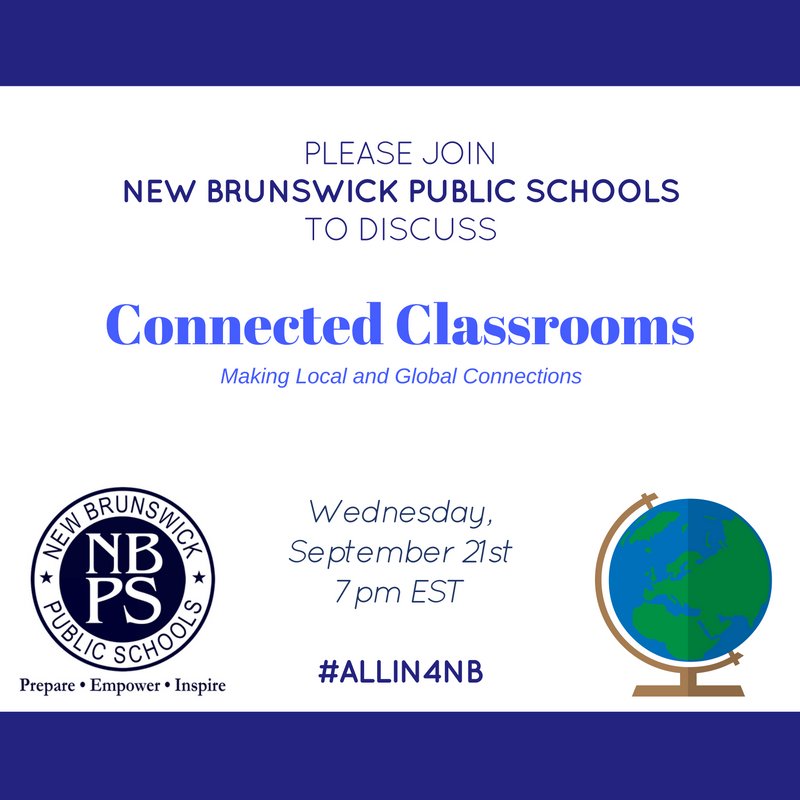
September Twitter Chat


New to Twitter? 
Click here for directions for signing up, using hashtags, and joining your first Twitter chat! 


Access SchoolDude from Anywhere!

We heard your feedback about logging in to Schooldude and have made some changes to help everyone!
 
Logging in and opening a ticket will remain exactly the same, but you no longer have to be in district to connect to our Schooldude servers.  You can now access it from the comfort of your home!  As a reminder the best way to access Schooldude is from the dropdown under "Staff Corner" on www.nbpschools.net or alternatively you can use this link: https://www.myschoolbuilding.com/sso/default.aspxacctnum=1507124224&productid=ITD

Remember your login credentials are the same ones you use to sign into your computer (firstname_lastname without the @nbpsnj.net for username and the same password you use to sign into your email).


Our New Web Filter Has Arrived

Good news! We have moved to a new educational based web filter called Lightspeed.  

What does this mean for you?  You will have an easier time requesting access to websites, as well as the option in the future to set up teacher "web zones" for your classrooms.  Everything else will remain the same from our previous web filter.  

Please feel free to reach out to Technology by opening a Schooldude IT request if you notice any problems with blocked web pages. A link is provided below with troubleshooting instructions and an explanation on how to unblock a website.

Click here for the Lightspeed How- To sheet.
Encouraging Digital Citizenship 

It's never too early to start talking to students about digital citizenship. 

Effective use of technology involves so much more than just knowing how to use a device or an application. 

Keeping our students safe and responsible online is a critical element in our efforts to successfully and effectively integrating technology as a part of everyday instruction.

This video touches upon some of the aspects of Digital Citizenship and will give you a few talking points that you can use with your students in the classroom and families can use at home as well. 


This video is also posted in our NBPS Google+ Community for Digital Citizenship. Please join this community and discuss your ideas about this video. Also, please feel free to start other discussions about digital citizenship within this Community and share resources for teaching digital citizenship. 

Naming Conventions for Google Docs

There's nothing like the start of the school year! Supplies are all new and fresh...our Google Classroom folders are empty, awaiting the assignments that our students will submit.

Fast forward to just a few weeks into the school year and those folders can suddenly become cluttered, making it difficult to find the documents we are looking for. This doesn't have to be the case if you set up Google Docs naming conventions early in the year. 

Setting up naming conventions for yourself and with your students is a very important step in getting and staying organized for the school  year.

Keep in mind that there's no one right system for establishing naming conventions. You will have to find a system that works for you. The more you work with Google Drive and Google Classroom, the more you will decide what works best for you. 

If you are looking for some suggestions or aren't sure where to start, here is a helpful article from Alice Keeler on 


If you have any questions or require additional support with this, please reach out to Melissa Morris Inoa, Supervisor of Instructional Technology. 


Software Inquiries

Please note that a new category has been created in SchoolDude for all software inquiries this year.

If you have a question about access or support for a district program or
application, or are inquiring about a program other than ones supported in-district please put your request in through an IT ticket in  SchoolDude under the category of "software."


Coming soon...A New Student Portal

In the near future, a new portal for students will arrive on our district website provided by Clever. This portal will give students access to all of their district assigned programs without having to remember numerous passwords. 

By entering their gmail username and password, the student will enter a program called Clever which will house many of our district approved programs. Each student will then see only the programs that are made available specifically to them, giving them a personalized experience.  As additional programs become available in Clever, they will be automatically added by the technology department. 

Please click on the link provided below for a how-to guide. 


Please stay tuned to the newsletter for additional details and programs that are now supported.


STAY CONNECTED
#ALLIN4NB
We're rapidly expanding our social media presence here at New Brunswick Public Schools and encourage all of you to follow us on  Twitter and  Instagram , while liking us on  Facebook. 

Already on Twitter?
 
Share your Twitter handle in this form and start connecting with other educators in NBPS and around the world: 

Always remember that your online posts are an extension of the classroom and school community,  so there can never be negative remarks about students or colleagues. We look forward to seeing you online. 

Follow us on social media, and use the hashtag #ALLIN4NB
New Brunswick Public Schools
268 Baldwin Street, New Brunswick, NJ 08901
732-745-5300