Email: info@brokerinformationservices.ie

Website: https://www.bis-platform.com


June Tip of the Month - Saving Tasks to Outlook Calendar


Welcome to our June Tip of the Month. This month we will look at another new feature which allows you to save Tasks created through The BIS Platform to your Outlook calendar.

There are a couple of options when saving Tasks to your Outlook calendar through BIS. Tasks can be saved to your Outlook calendar through the Tasks / Events home page or through the Task screen itself.


See below the steps involved in saving Tasks created on BIS to your Outlook calendar;


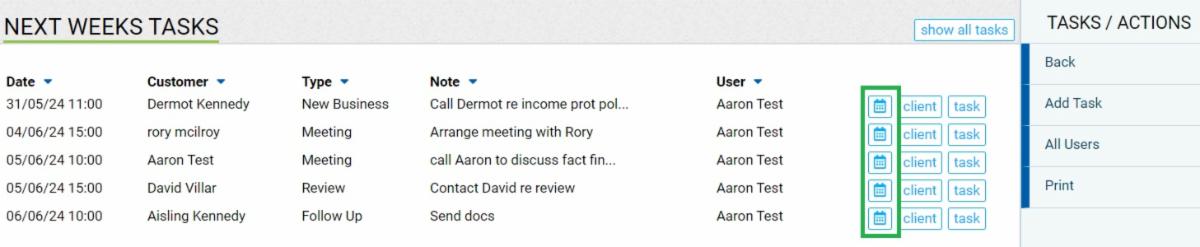
To save a task through the 'Tasks / Events Home' page using the calendar icon, follow the steps below;


  • Tasks / Events menu > Tasks / Events Home > select download outlook calendar file using the calendar icon to the right of the task which will begin to download the task


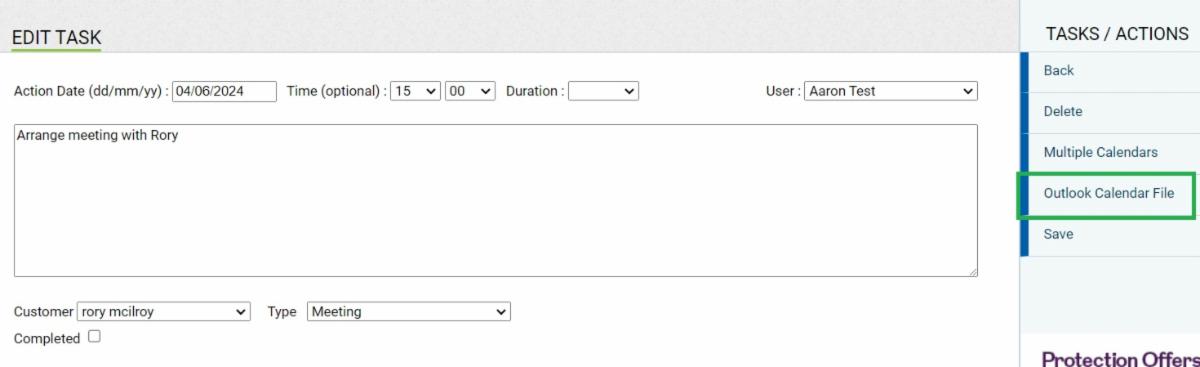
To save a task through the task screen using the 'Outlook Calendar File' option, follow the steps below;


  • Click into the task you would like to save > select Outlook Calendar File under tasks / actions which will begin to download the task

Once the tasks have finished downloading following the completion of the steps above, you can find the downloaded tasks (.ics file) in your downloads folder located in the file explorer on your device.


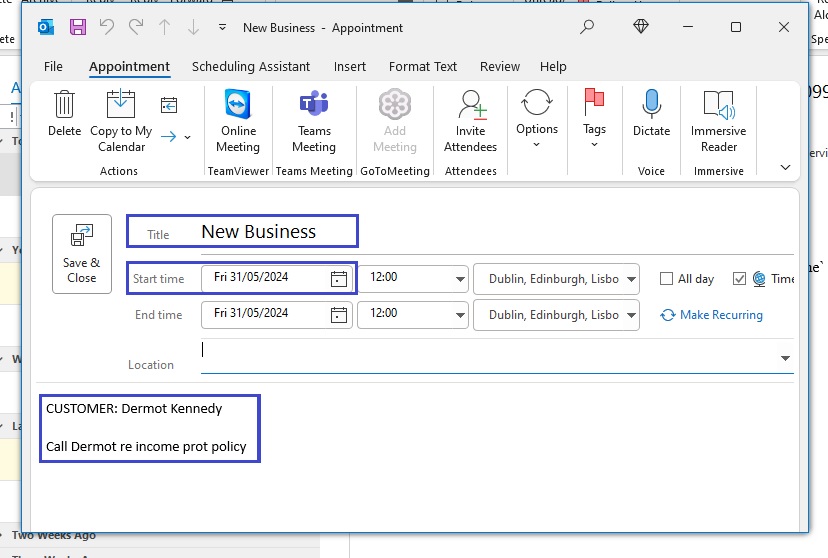
The downloaded task will be titled in conjunction with the type of task e.g. New Business as seen below, and will include the client name, task description and will bring across the date & time also.


To proceed with saving the Task to your Outlook calendar, follow the steps below;


  • Click on the task (.ics file) in your downloads as if to open the task > This will then redirect you to the Screen below which carries over all of the task details into an Outlook task > add in any additional notes if necessary > Select Save & Close to add this to your Outlook Calendar


Once this is complete, the task will now show in your calendar on Outlook.

For further description on how to save a Task to your Outlook calendar, please see our short instructional video here

If you would like to find out more about saving Tasks from The BIS Platform to your Outlook calendar, you can contact the office on 01 496 0006 or email us at info@brokerinformationservices.ie.


If you are not currently using BIS and you would like to find out more, please do not hesitate to get in contact with us on 01 496 0006 or email us at info@brokerinformationservices.ie.


Our July tip will be with you again next month, so be sure to stay tuned for some more great information on The BIS Platform.

Previous Tips for The BIS Platform

Assigning Handlers

CP116 Link for your website

PEPs Screening

Policy Alterations

Action / Task Types for Tasks

Adding Deals to Sales Pipeline

Letter / Report Templates

Email Merge / Client Newsletters

Sales Pipeline

Scanned Documents Uploader

Client AML Status

New Dashboard Release