Learn21's Weekly EdTech Update

December 21, 2023

How Much Time Do We Have?

Teachers often incorporate timers in the classroom to manage and optimize time effectively. These simple devices serve multiple purposes: fostering time awareness among students, pacing lessons, and facilitating transitions between activities. By setting a visible timer during tasks, students become more conscious of time, encouraging them to focus and work efficiently. This is particularly helpful during exams or timed activities, where students learn to manage their time effectively. Timers also help teachers keep track of where they are in the schedule so they don't overrun some activities and shortchange others.


We have some definite helpful uses of a timer, but what timers can we use?


Mechanical

You can always use a mechanical timer, perhaps the simplest way of integrating a timer into the classroom. This form of technology integration in the classroom is a great way to provide a timer without requiring a lot of training for the teacher or the students. The timer also only takes up wall space, not any display space on the projector or large TV. This solution, while cost-effective, isn't free from considerations like battery replacement or finding a power outlet. It all depends on the timer you picked.


Google timer

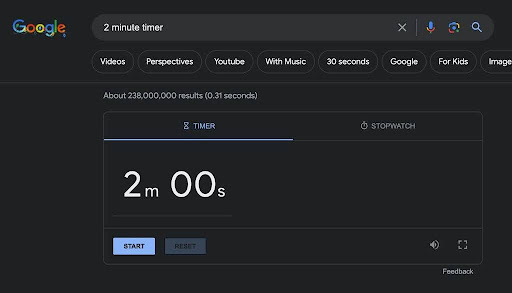
The next timer is the one Google supplies with their search engine. To use Google's timer, simply enter the length of the timer into the search bar and this will display a timer in the results. For example 2 minute timer will give you a timer all set to count down from two minutes:

Video timers

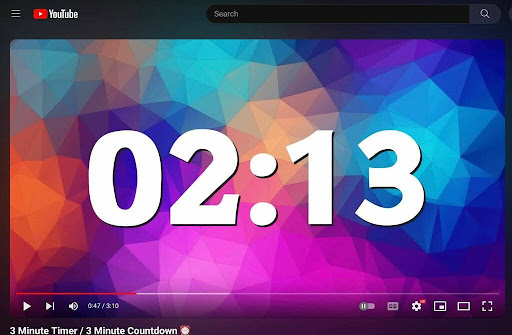
YouTube has thousands of different videos for different times. For more specific times, like 2 minutes 13 seconds, you can get creative with a 3-minute timer on YouTube and scrub forward 47 seconds to start your 2 minute, 13 minute timer.

This is the best looking option, and it can also have background music or a cool sound effect at the end. I prefer YouTube videos over any of the other solutions because e\they look better.


What if I don't want to monopolize my screen with a timer?

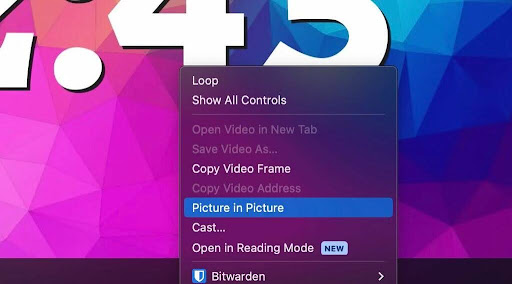
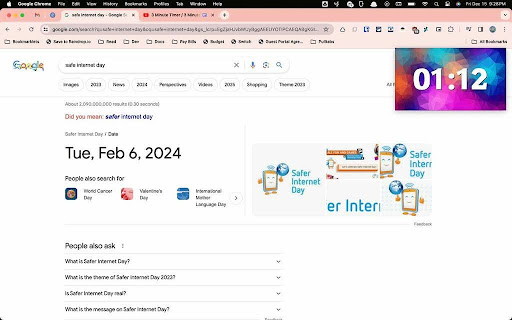
Once we start using videos for timers, we've opened up a cool feature that allows us to float the timer on top of everything else on the computer. Once the video is playing, double-right click on it.

A menu will show with an item called Picture in Picture. Selecting this option pulls the video out into a window that will float on top of everything else on the screen. You can then open other programs or websites and not have the timer interfere. This is a boon for multitasking aficionados.

Finally, if you want the Picture in Picture video without having to double-right click, Google has the Picture-in-Picture Extension. After you install it, you can pin it to your toolbar giving you a single click to pop a video out into picture-in-picture.


Just a small subset of timer options

This is just a taste of what's possible with timers in your classroom. As I said, I prefer the YouTube videos, but I could also understand wanting to use a mechanical timer.


Some considerations when using timers in classes

While using visible timers can be advantageous for many students it can be a hinderance for others. Students with anxiety or other neurodivergent ways of thinking may feel increased pressure due to the timer looming over them.


It is also important to keep students with accommodations in mind. Using visible timers in a testing situation may be distracting if there are students in the same room who receive different amounts of time to complete assessments.


Knowing the learners in your clasasroom is key. Seeing what works for them. Perhaps students who struggle with a visible timer would benefit from a verbal reminder of time remaining at appropriate intervals. It is always helpful to think of the task at hand and how learners will benefit or be hindered by the technology we employ.

Tips and Tricks

Scammers using QR codes to trick you. It was only a matter of time before the scammers used QR codes to trick us. With the ubiquity of QR codes, it's going to get harder and harder to trust them. The best way to stay safe is to remain vigilant after scanning a QR code. Don't enter any private information into a site that you just scanned that you are not familiar with, and if you sniff any sketchiness, close that tab and move on.


Google Chrome 120 - My desktop updated to Google Chrome 120 so now I'm going through the new features. Right away I noticed the tab search moved to the left side of the window. Another change I noticed was the different font used for bookmarks on the bookmarks bar. Read-aloud mode has made an appearance, but it's hidden behind the chrome://flags/#read-anything-read-aloud flag. This mode opens a side panel to the right and allows you to have the browser read the page to you. I couldn't get it to work on the Mac version of Chrome, so your mileage may vary.


Insert animated gifs and stickers directly into a Google Slide - I don't know how many middle school teachers are going to be excited about this, but at least they haven't added the typewriter animation for text... Yet.

Learn21 Update


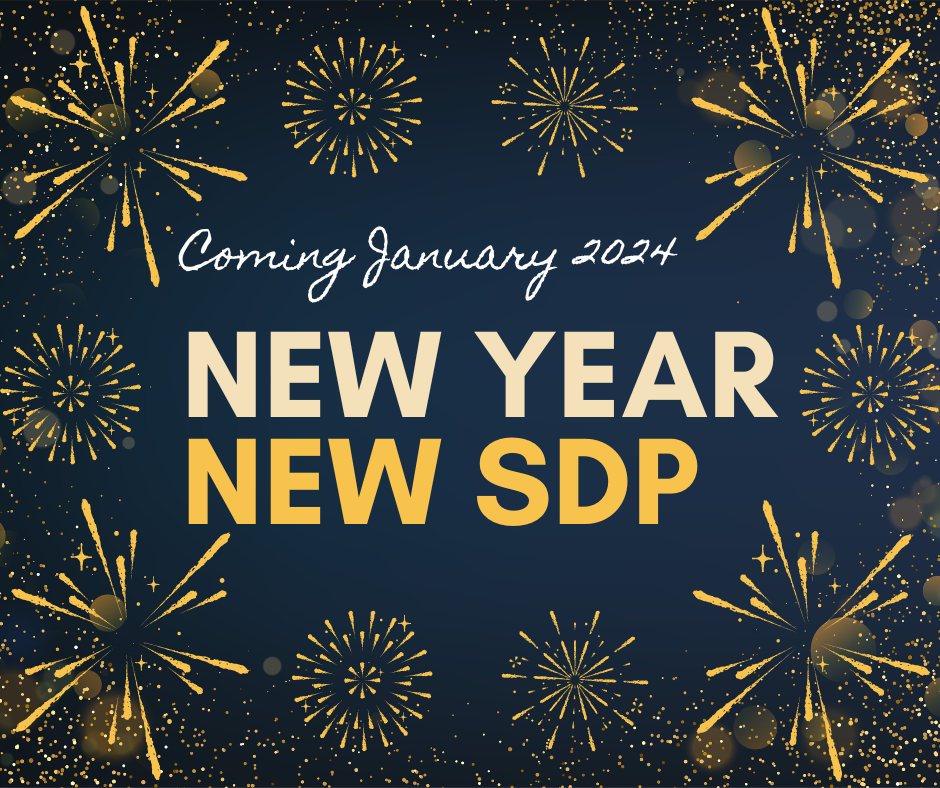
New Year, New Student Data Privacy (SDP)

The Learn21 Team recently reflected on our successes over the past full year. We’ve got so much to be proud of:

  • Our Ohio CoSN - ISTE Conference brought together over 300 educators in Ohio;
  • Four of our team members earned their ISTE Certified Educator;
  • Three of our team members earned their Certified Cybersecurity Rubric Evaluator;
  • We launched Helpdesk, the latest tool in the Tech Director Toolbox designed to streamline technology integration in schools;
  • Learn21 has been recognized as thought leaders in the field of AI in education and designing our AI Campground; and
  • We shared 31 Scary Apps that highlighted apps with privacy policies that should give educators a fright. 


There’s so much more that we could mention, but we got off on a tangent talking about Scary Apps and the great conversations it spawned. We’re definitely bringing Scary Apps back in October 2024, but we just didn’t feel comfortable giving the vibe that student privacy was something that only mattered in October. 


So, we're thrilled to announce our upcoming campaign, New Year, New SDP, a month-long journey into the intricate world of student data privacy - a vital component of modern education. The campaign will conclude on January 28, 2024, Data Privacy Day, where we will release a student data privacy checklist to support educators as they strive to protect student data privacy. Each week, we’ll have a new focus area. 


Week 1: Data Sharing Demystified

In the first week of our campaign, we delve into the realm of data sharing. We'll unravel the nuances between collaboration and caution, guiding you through best practices and empowering you to make informed decisions about sharing student information securely.


Week 2: Picturing Privacy - Snapshots and Security

Pictures capture moments, but what about the moments they capture? In week two, we explore the intricacies of student pictures and the potential privacy pitfalls. Learn how to strike the perfect balance between commemorating memories and safeguarding student identities.


Week 3: Advertising Awareness - Balancing Exposure

In the age of digital information, ads surround us. But what about student data in the advertising arena? Week three unveils the curtain on advertising practices in education, helping you navigate the fine line between exposure and privacy.


Week 4: Allies in Privacy - Organizations Leading the Way

Our final week celebrates the organizations that champion student data privacy. Discover the allies, including Learn21, that stand by your side, advocating for best practices and setting the standard for a privacy-centric education landscape.


Each weekday we will highlight a best practice that aligns with the theme for the week. New Year, New SDP will conclude on January 28, 2024, Data Privacy Day, where we unveil the Learn21 Student Data Privacy Checklist. 


Bridging the Gap - Our Data Privacy Support Services

As we embark on this educational journey together, we want to assure you that our commitment to student data privacy extends beyond words. Learn21 offers cutting-edge Data Privacy Support Services designed to empower schools with the knowledge and tools needed to fortify their data defenses.


How Can Learn21 Assist You?

1. Comprehensive Privacy Audits: Let us scrutinize your current privacy practices and provide actionable insights for improvement.


2. Customized Training Sessions: Equip your staff with the knowledge and skills to maintain a secure digital environment for students.


3. Policy Development and Review: Ensure your school's privacy policies align with the latest regulations and best practices.


4. 24/7 Data Security Support: Our dedicated team is here to address any concerns and provide real-time assistance whenever you need it.


Join Us on this Journey

As we embark on this year-long exploration, we invite you to join us on this journey. Student data privacy isn't just a buzzword; it's a cornerstone of modern education. Let's equip ourselves with knowledge, fortify our practices, and champion a secure and respectful environment for our students.


Are you ready to take the plunge into a year dedicated to student privacy? Let's make 2024 the year we redefine privacy in education!


For more information on our Data Privacy Support Services, reach out to us at info@learn21.org.


Here's to a year of privacy, progress, and profound educational experiences!

Extra Credit


We use Google Images all the time, and Google just published a guide on using About This Image in Google Image Search. This tool can give you historical information on the image, along with hints as to whether it is AI generated.


My go to saying for AI hallucinations is that it "can lie with the confidence of a middle schooler that just got caught vaping." Apparently ChatGPT can get lazy because it's close to winter break, just like many of us as we get closer to a well earned winter break!


Work life balance is important, and there is some evidence that if you're pressured to work after hours, your productivity suffers.


Babbel is listing the most mispronounced words Of 2023. I prefer to just make up new words to see if the other person is paying attention. Just last week I used studiciously in a conversation. It means your working more than just studiously, feel free to us it with others to see if they notice!

This will be our last newsletter of 2023. We will be back with even more insights, tricks and tips, and Learn21 updates in 2024!


Happy Holidays from the Learn21 Team!

Bytes and Insights is written by Eduk8me’s Ryan Collins who writes about education and educational technology. He’s also the Director of Technology for Kenton City Schools in Ohio. Sign up for his Of Bits and Bytes newsletter at https://eduk8.me.


If you'd like to take a hiatus from Bytes & Insights, please use the Update Profile link below. This will allow you control over which emails you receive from Learn21.

www.learn21.org

LinkedIn        X        Instagram