Dear Valued ARINCDirect Customer, 


We are excited to announce the latest feature available via the NextGen Flight Planning application within Izon: Airport Suitability. This feature performs dozens of checks across each of the airports identified in your flight plans and provides a pass / fail status of the suitability of each airport based on thresholds you set.  


Checks include:  

  • Airport Checks 
  • Runway Checks 
  • Terminal Checks 
  • Approach Checks 


More on the report and how to access it will be shared soon when the Airport Suitability Report is released. 

To gain the most benefit out of Airport Suitability, admins should access the newly created Aircraft Profile section for Airport Suitability now. On the Aircraft Profile within NextGen Flight Planning, account admins can update the thresholds for Airport Suitability for each tail in your fleet. Addressing these settings now, will put all flight planners in a position to receive a comprehensive Airport Suitability Report upon the upcoming release. 


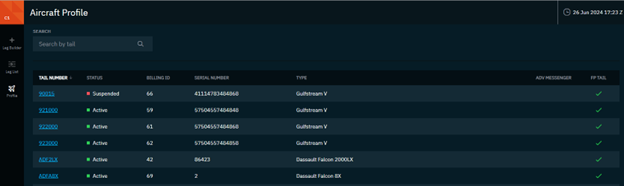
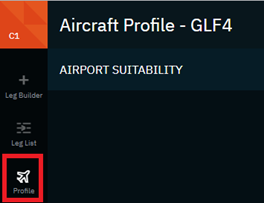
To access the Aircraft Profile, account admins must navigate to the left-hand menu and select the Profile Icon. The landing page for the Aircraft Profile will display all tails within the fleet in a list.

This list will depict the following information for each tail: 

  • Active Status 
  • Billing ID 
  • Serial Number 
  • Type 
  • Advanced Messenger 
  • Flight planning subscription indicator (green check) 


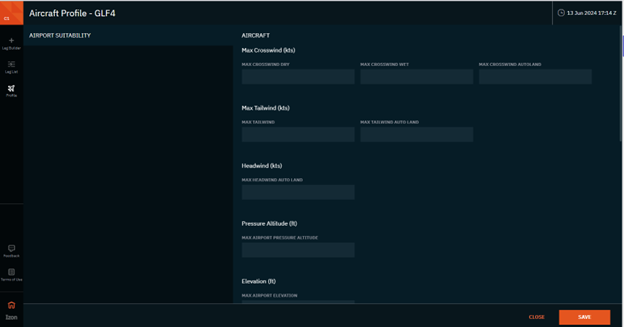
Once admins have selected a tail by clicking on the tail hyperlink, the Airport Suitability section shall appear. This is the first of NextGen tail settings that will be offered in this new Aircraft Profile section. 

We encourage all account admins to access this Aircraft Profile section now to address the Airport Suitability parameters:  

  • Max Crosswind (in knots) 
  • Dry 
  • Wet 
  • Autoland 
  • Max Tailwind (in knots) 
  • Autoland 
  • Max Headwind (autoland only - in knots) 
  • Max Airport Pressure Altitude (in feet)
  • Max Airport Elevation (in feet) 
  • Approach Speed Category (A, B, C, D, or E) 
  • Max Approach Angle (in degrees)  
  • Landing Category 
  • Runway 
  • Runway Width (in feet) 
  • Runway Length (in feet) 
  • Runway Slope (% between 0.0-5.0%) 
  • RFF min (0-10) 
  • RVR will be listed here as display only. To update RVR, access the Legacy Tail Profile and the value will be shown in this NextGen section (non-modifiable). 

With these parameters stored, you will be ready to generate the Airport Suitability Report when released in a future update. More information about these enhancements can be found in the Airport Suitability and Aircraft Profile Release Notes


Get Access   


Learn More 


Need further assistance?   


We are here to help. Please reach out to our 24x7 Izon Support Team at +1 410-266-2266 or via the embedded feedback button within Izon. As the backbone of the new Collins business aviation digital experience, the Izon dashboard will continue to expand as additional integrated solutions are brought online. From all of us at ARINCDirect, we want to thank you for your continued support as we rise above business as usual


Contact 24x7 Support