Volume 98 | Tuesday, July 9, 2024

Jump Seat Logo _New_.png

European Data Link Mandate

Welcome back to Jump Seat. Since February 2020, the European Data Link Mandate has required ATN CPDLC equipage when operating above FL285 in European airspace. A small, but impactful change is scheduled to take place on July 11, 2024. This week let’s take a look at how you can ensure your ARINCDirect flight plans comply with this new guidance.

What is the Data Link Mandate?


The mandate requires that aircraft intending to operate above FL285 (28,500 ft) in European airspace have ATN CDPLC equipment. Many business/GA aircraft, though, are exempt from the mandate. What follows are possible reasons for exemptions:


  • Aircraft with an individual certificate of airworthiness first issued before 1 January 1995.
  • Aircraft with an individual certificate of airworthiness first issued before 1 January 2018 and fitted before this date with FANS 1/A.
  • Aircraft that have a certified maximum seating capacity of 19 passengers or fewer and a maximum certified take-off mass of 45,359 Kg (100,000 lbs) or less, and with a first individual certificate of airworthiness issued before 5 February 2020.
  • State aircraft.
  • Test, maintenance, or delivery flights.
  • Aircraft types that are on the permanently exempt list (please see the list in Appendix I).


Change is Coming


Eurocontrol has issued a notice that their Integrated Initial Flight Plan Processing System (IFPS) will begin checking flight plan submissions for the presence of the proper ICAO equipment codes to comply with the mandate. Previously the IFPS did not reject flight plans that failed to properly indicate compliance with the data link mandate. Beginning on July 11, 2024, operators intending to fly above FL285 (28,500 ft) will need one of the following in their flight plans:


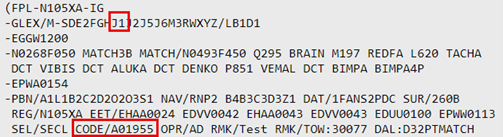
  • Compliant aircraft should indicate code J1 in item 10a of the ICAO flight plan and the aircraft’s 24 bit address in the CODE section of item 18. Note: If J1 is present and the CODE field is missing, then the flight plan will be rejected.
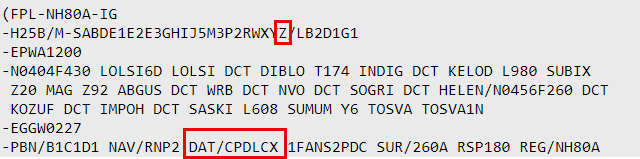
  • Exempt aircraft should include the code Z in item 10a and also include CPDLCX in the DAT field of item 18.

How Can ARINCDirect Subscribers Prepare?


Account administrators are encouraged to review their aircraft configurations on the Tails section of the ARINCDirect website, they can find this under the My Company tab. If your aircraft is not exempt, then ensure the following:


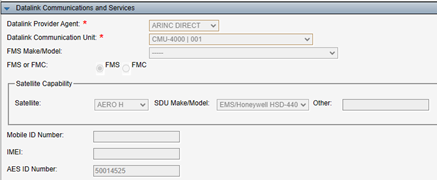
  • The AES ID Number is filled out in the Datalink Communication and Services section. Please note that this field will be grayed out and you will need to contact ARINCDirect in order to change it.
  • The AES ID Number will be automatically converted to a hexadecimal value to be included in the CODE field. 
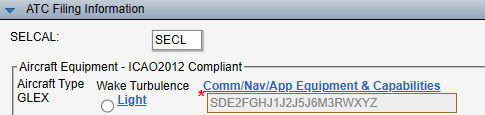
  • Code J1 is entered in the Comm/Nav/App Equipment & Capabilities field, which is found in the ATC Filing Information Section. This section can be edited by clicking the hyperlink. Be sure to click Save on that page once edits are made.

If your aircraft is exempt, then please ensure the following: 


  • CPDLCX is entered in the DAT field of the ATC Filing Information Section

For users without administrator privileges on their account, please verify the necessary equipment codes by reviewing a completed flight plan. Remember, ARINCDirect only allows designated account admins to make changes to aircraft data, so please keep this in mind when contacting us.


As always, our 24/7 Flight Operations team is available via phone or email and is standing by to assist with questions about the European Datalink Mandate.

Did you know?

  • ARINCDirect Flight Operations has an updated email address. Moving forward please use ad-flightops@collins.com when contacting them via email.


Useful Links

Thank you for reading!

More Jump Seat
ARINCDirect Support